Contents |
AITurretShape
Provides an AI controlled turret. Uses the AITurretShapeData datablock, which is based on the TurretShapeData datablock for common properties. AITurretShape builds an AI controlled turret. It uses a state machine and properties as defined in AITurretShapeData to decide how to find targets and what to do with them. As with TurretShape (which AITurretShape derives from) the AITurretShape class provides the base on which ShapeBaseImageData weapons may be mounted.
Overview
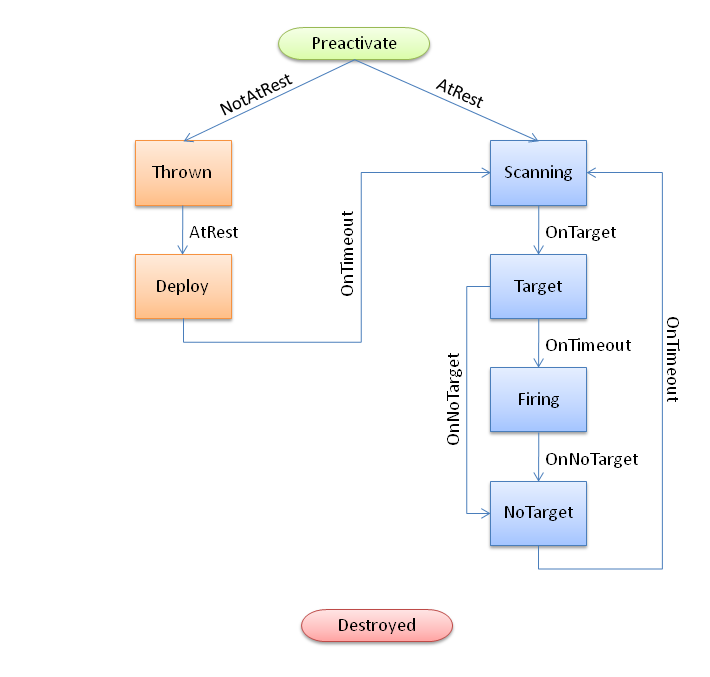
The AITurretShape functions through the use of a state machine as defined in its AITurretShapeData datablock. It is very similar to how ShapeBaseImageData works. This allows you to customize exactly how the turret behaves while it searches for a target, and what it does once it has a target. But in general, the AI turret goes through a number of stages:
Scanning
The AI turret usually starts off by scanning for a suitable target. This is done by checking for targets within a pie wedge shaped volume in front of the turret based on where the scanPoint node is placed. The turret takes cover into account when searching for a target so that it doesn't "cheat".
Gained Target
Once a target is acquired the turret attempts to follow it. Usually at this point the turret activates its weapon. If a target is lost due to it going behind cover, the turret will attempt to follow and reacquire the target using its last known position and velocity. The amount of time allowed for this attempt is defined by AITurretShapeData::trackLostTargetTime.
Lost Target
If the target is lost (either by going behind cover or it is dead) the turret returns to its scanning mode to find another victim.
Destroyed
If the AI turret is destroyed then it can go into a special state to show the user that it has been destroyed. As with TurretShape turrets a AITurretShape may respawn after a set amount of time (see TurretShape and TurretShape::doRespawn()).
Deployable Turret
In addition to AI turrets being placed within a mission, it is also possible for a player to deploy a turret such as throwing one from their inventory. When a turret has been tossed it will be in a Thrown state and usually in an inactive mode. Once the turret comes to rest on the ground it moves into a Deploy state where it may unfold to get ready. Once ready the turret begins the scanning process. As the AI turret's state machine may be customized for your specific circumstances, the way in which turrets are deployed by a player is up to you. An AI turret could be thrown in a fully working state, ready to take out targets before the turret even hits the ground.
Example State Machine
Here is an example AITurretShapeData datablock with a defined state machine and the script to support the state machine. This is just one possible example.
- Example:
//-----------------------------------------------------------------------------
// AI Turret
//-----------------------------------------------------------------------------

datablock AITurretShapeData(AITurret)
{
   category = "Turrets";
   shapeFile = "art/shapes/weapons/Turret/Turret_Legs.DAE";

   maxDamage = 70;
   destroyedLevel = 70;
   explosion = GrenadeExplosion;

   simpleServerCollision = false;

   zRotOnly = false;

   // Rotation settings
   minPitch = 15;
   maxPitch = 80;
   maxHeading = 90;
   headingRate = 50;
   pitchRate = 50;

   // Scan settings
   maxScanPitch = 10;
   maxScanHeading = 30;
   maxScanDistance = 20;
   trackLostTargetTime = 2;

   maxWeaponRange = 30;

   weaponLeadVelocity = 0;

   // Weapon mounting
   numWeaponMountPoints = 1;

   weapon[0] = AITurretHead;
   weaponAmmo[0] = AITurretAmmo;
   weaponAmmoAmount[0] = 10000;

   maxInv[AITurretHead] = 1;
   maxInv[AITurretAmmo] = 10000;

   // Initial start up state
   stateName[0]                     = "Preactivate";
   stateTransitionOnAtRest[0]       = "Scanning";
   stateTransitionOnNotAtRest[0]    = "Thrown";

   // Scan for targets
   stateName[1]                     = "Scanning";
   stateScan[1]                     = true;
   stateTransitionOnTarget[1]       = "Target";
   stateSequence[1]                 = "scan";
   stateScript[1]                   = "OnScanning";

   // Have a target
   stateName[2]                     = "Target";
   stateTransitionOnNoTarget[2]     = "NoTarget";
   stateTransitionOnTimeout[2]      = "Firing";
   stateTimeoutValue[2]             = 2.0;
   stateScript[2]                   = "OnTarget";

   // Fire at target
   stateName[3]                     = "Firing";
   stateFire[3]                     = true;
   stateTransitionOnNoTarget[3]     = "NoTarget";
   stateScript[3]                   = "OnFiring";

   // Lost target
   stateName[4]                     = "NoTarget";
   stateTransitionOnTimeout[4]      = "Scanning";
   stateTimeoutValue[4]             = 2.0;
   stateScript[4]                   = "OnNoTarget";

   // Player thrown turret
   stateName[5]                     = "Thrown";
   stateTransitionOnAtRest[5]       = "Deploy";
   stateSequence[5]                 = "throw";
   stateScript[5]                   = "OnThrown";

   // Player thrown turret is deploying
   stateName[6]                     = "Deploy";
   stateTransitionOnTimeout[6]      = "Scanning";
   stateTimeoutValue[6]             = 2.5;
   stateSequence[6]                 = "deploy";
   stateScaleAnimation[6]           = true;
   stateScript[6]                   = "OnDeploy";

   // Special state that is set when the turret is destroyed.
   // This state is set in the onDestroyed() callback.
   stateName[7]                     = "Destroyed";
   stateSequence[7]                 = "destroyed";
};

//-----------------------------------------------------------------------------
// Deployable AI Turret
//-----------------------------------------------------------------------------
datablock AITurretShapeData(DeployableTurret : AITurret)
{
   // Mission editor category
   category = "Weapon";

   className = "DeployableTurretWeapon";

   startLoaded = false;

   // Basic Item properties
   mass = 1.5;
   elasticity = 0.1;
   friction = 0.6;
   simpleServerCollision = false;

   // Dynamic properties defined by the scripts
   PreviewImage = 'turret.png';
   pickUpName = "a deployable turret";
   description = "Deployable Turret";
   image = DeployableTurretImage;
   reticle = "blank";
   zoomReticle = 'blank';
};

// ----------------------------------------------------------------------------
// AITurretShapeData
// ----------------------------------------------------------------------------

function AITurretShapeData::onAdd(%this, %obj)
{
   Parent::onAdd(%this, %obj);

   %obj.mountable = false;
}

// Player has thrown a deployable turret.  This copies from ItemData::onThrow()
function AITurretShapeData::onThrow(%this, %user, %amount)
{
   // Remove the object from the inventory
   if (%amount $= "")
      %amount = 1;
   if (%this.maxInventory !$= "")
      if (%amount > %this.maxInventory)
         %amount = %this.maxInventory;
   if (!%amount)
      return 0;
   %user.decInventory(%this,%amount);

   // Construct the actual object in the world, and add it to
   // the mission group so it's cleaned up when the mission is
   // done.  The turret's rotation matches the player's.
   %rot = %user.getEulerRotation();
   %obj = new AITurretShape()
   {
      datablock = %this;
      rotation = "0 0 1 " @ getWord(%rot, 2);
      count = 1;
      sourceObject = %user;
      client = %user.client;
      isAiControlled = true;
   };
   MissionGroup.add(%obj);

   // Let the turret know that we're a firend
   %obj.addToIgnoreList(%user);

   // We need to add this turret to a list on the client so that if we die,
   // the turret will still ignore our player.
   %client = %user.client;
   if (%client)
   {
      if (!%client.ownedTurrets)
      {
         %client.ownedTurrets = new SimSet();
      }

      // Go through the client's owned turret list.  Make sure we're
      // a friend of every turret and every turret is a friend of ours.
      // Commence hugging!
      for (%i=0; %i<%client.ownedTurrets.getCount(); %i++)
      {
         %turret = %client.ownedTurrets.getObject(%i);
         %turret.addToIgnoreList(%obj);
         %obj.addToIgnoreList(%turret);
      }

      // Add ourselves to the client's owned list.
      %client.ownedTurrets.add(%obj);
   }

   return %obj;
}

function AITurretShapeData::onDestroyed(%this, %turret, %lastState)
{
   // This method is invoked by the ShapeBase code whenever the
   // object's damage state changes.

   %turret.playAudio(0, TurretDestroyed);
   %turret.setAllGunsFiring(false);
   %turret.resetTarget();
   %turret.setTurretState( "Destroyed", true );

   // Set the weapons to destoryed
   for(%i = 0; %i < %this.numWeaponMountPoints; %i++)
   {
      %turret.setImageGenericTrigger(%i, 0, true);
   }

   Parent::onDestroyed(%this, %turret, %lastState);
}

function AITurretShapeData::OnScanning(%this, %turret)
{
   //echo("AITurretShapeData::OnScanning: " SPC %this SPC %turret);

   %turret.startScanForTargets();
   %turret.playAudio(0, TurretScanningSound);
}

function AITurretShapeData::OnTarget(%this, %turret)
{
   //echo("AITurretShapeData::OnTarget: " SPC %this SPC %turret);

   %turret.startTrackingTarget();
   %turret.playAudio(0, TargetAquiredSound);
}

function AITurretShapeData::OnNoTarget(%this, %turret)
{
   //echo("AITurretShapeData::OnNoTarget: " SPC %this SPC %turret);

   %turret.setAllGunsFiring(false);
   %turret.recenterTurret();
   %turret.playAudio(0, TargetLostSound);
}

function AITurretShapeData::OnFiring(%this, %turret)
{
   //echo("AITurretShapeData::OnFiring: " SPC %this SPC %turret);

   %turret.setAllGunsFiring(true);
}

function AITurretShapeData::OnThrown(%this, %turret)
{
   //echo("AITurretShapeData::OnThrown: " SPC %this SPC %turret);

   %turret.playAudio(0, TurretThrown);
}

function AITurretShapeData::OnDeploy(%this, %turret)
{
   //echo("AITurretShapeData::OnDeploy: " SPC %this SPC %turret);

   // Set the weapons to loaded
   for(%i = 0; %i < %this.numWeaponMountPoints; %i++)
   {
      %turret.setImageLoaded(%i, true);
   }

   %turret.playAudio(0, TurretActivatedSound);
}
And here is the above example state machine's flow:
Shape File Nodes
In addition to the required TurretBase nodes, AITurretShape makes use of additional nodes within the shape file to allow the AI to do its work. The first is the 'scanPoint' node. This is used by the AI to project a pie wedge shaped scanning volume in which to detect possible targets. The scanPoint node is at the apex of the scanning wedge. If the scanPoint node is not present within the shape file then the turret's world transform is used.
The second is the 'aimPoint' node. Once the AI turret has obtained a target the aimPoint is used to point the turret at the target. Specifically, the turret rotates in both pitch and heading such that the aimPoint points at the target. If you're using a weapon that doesn't have its muzzle point on the same plane as its mount point (known as an off-axis weapon) then be sure to place the aimPoint at a z position equivalent to the weapon's muzzle point. This allows for the correct pitch calculation. If the aimPoint is not found on the turret's shape, then the pitch node will be used.
Ignore List
AI turrets keep track of an ignore list. This is used by default to stop a player deployed turret from targeting its owner, even when that owner is killed and respawns. But this ignore list could also be used to have the turret ignore team mates, squad members, invisible players, etc. Use AITurretShape::addToIgnoreList() and AITurretShape::removeFromIgnoreList() to manipulate this list. You should also look in scripts/server/turret.cs at AITurretShapeData::onThrow() to see how the ignore list is handled and deployed turrets are kept track of on a per connected client basis.
Member Function Documentation
| void AITurretShape::activateTurret | ( | ) |
Activate a turret from a deactive state.
| void AITurretShape::addToIgnoreList | ( | ShapeBase | obj | ) |
Adds object to the turret's ignore list.
All objects in this list will be ignored by the turret's targeting.
- Parameters:
-
obj The ShapeBase object to ignore.
| void AITurretShape::deactivateTurret | ( | ) |
Deactivate a turret from an active state.
| SimObject AITurretShape::getTarget | ( | ) |
Get the turret's current target.
- Returns:
- The object that is the target's current target, or 0 if no target.
| float AITurretShape::getWeaponLeadVelocity | ( | ) |
Get the turret's defined projectile velocity that helps with target leading.
- Returns:
- The defined weapon projectile speed, or 0 if leading is disabled.
| bool AITurretShape::hasTarget | ( | ) |
Indicates if the turret has a target.
- Returns:
- True if the turret has a target.
| void AITurretShape::recenterTurret | ( | ) |
Recenter the turret's weapon.
| void AITurretShape::removeFromIgnoreList | ( | ShapeBase | obj | ) |
Removes object from the turret's ignore list.
All objects in this list will be ignored by the turret's targeting.
- Parameters:
-
obj The ShapeBase object to once again allow for targeting.
| void AITurretShape::resetTarget | ( | ) |
Resets the turret's target tracking.
Only resets the internal target tracking. Does not modify the turret's facing.
| void AITurretShape::setAllGunsFiring | ( | bool | fire | ) |
Set the firing state of the turret's guns.
- Parameters:
-
fire Set to true to activate all guns. False to deactivate them.
| void AITurretShape::setGunSlotFiring | ( | int | slot, | |
| bool | fire | |||
| ) |
Set the firing state of the given gun slot.
- Parameters:
-
slot The gun to modify. Valid range is 0-3 that corresponds to the weapon mount point. fire Set to true to activate the gun. False to deactivate it.
| void AITurretShape::setTurretState | ( | string | newState, | |
| bool | force = false | |||
| ) |
Set the turret's current state.
Normally the turret's state comes from updating the state machine but this method allows you to override this and jump to the requested state immediately.
- Parameters:
-
newState The name of the new state. force Is true then force the full processing of the new state even if it is the same as the current state. If false then only the time out value is reset and the state's script method is called, if any.
| void AITurretShape::setWeaponLeadVelocity | ( | float | velocity | ) |
Set the turret's projectile velocity to help lead the target.
This value normally comes from AITurretShapeData::weaponLeadVelocity but this method allows you to override the datablock value. This can be useful if the turret changes ammunition, uses a different weapon than the default, is damaged, etc.
- Note:
- Setting this to 0 will disable target leading.
| void AITurretShape::startScanForTargets | ( | ) |
Begin scanning for a target.
| void AITurretShape::startTrackingTarget | ( | ) |
Have the turret track the current target.
| void AITurretShape::stopScanForTargets | ( | ) |
Stop scanning for targets.
- Note:
- Only impacts the scanning for new targets. Does not effect a turret's current target lock.
| void AITurretShape::stopTrackingTarget | ( | ) |
Stop the turret from tracking the current target.
AITurretShapeData
The following shows all datablock fields for an AITurretShapeData, which is required to create a new AI Turret.
Member Data Documentation
Maximum distance to scan.
When combined with maxScanHeading and maxScanPitch this forms a 3D scanning wedge used to initially locate a target.
Maximum number of degrees to scan left and right.
- Note:
- Maximum scan heading is 90 degrees.
Maximum number of degrees to scan up and down.
- Note:
- Maximum scan pitch is 90 degrees.
Maximum distance that the weapon will fire upon a target.
How often should we perform a full scan when looking for a target.
Expressed as the number of ticks between full scans, but no less than 1.
Random amount that should be added to the scan tick frequency each scan period.
Expressed as the number of ticks to randomly add, but no less than zero.
| bool AITurretShapeData::stateDirection[31] |
Direction of the animation to play in this state.
True is forward, false is backward.
| bool AITurretShapeData::stateFire[31] |
The first state with this set to true is the state entered by the client when it receives the 'fire' event.
| caseString AITurretShapeData::stateName[31] |
Name of this state.
If true, the timeScale of the stateSequence animation will be adjusted such that the sequence plays for stateTimeoutValue seconds.
| bool AITurretShapeData::stateScan[31] |
Indicates the turret should perform a continuous scan looking for targets.
| AITurretShapeData::stateScript[31] |
Method to execute on entering this state. is state. AITurretShapeData.
| string AITurretShapeData::stateSequence[31] |
Name of the sequence to play on entry to this state. is state.
| AITurretShapeData::stateTimeoutValue[31] |
Time in seconds to wait before transitioning to stateTransitionOnTimeout. nTimeout.
| AITurretShapeData::stateTransitionOnActivated[31] |
Name of the state to transition to when the turret goes from deactivated to activated. ctivated.
| AITurretShapeData::stateTransitionOnAtRest[31] |
Name of the state to transition to when the turret is at rest (static). (static).
| AITurretShapeData::stateTransitionOnDeactivated[31] |
Name of the state to transition to when the turret goes from activated to deactivated. ctivated.
| AITurretShapeData::stateTransitionOnNoTarget[31] |
Name of the state to transition to when the turret loses a target. a target.
| AITurretShapeData::stateTransitionOnNotAtRest[31] |
Name of the state to transition to when the turret is not at rest (not static). static).
| AITurretShapeData::stateTransitionOnTarget[31] |
Name of the state to transition to when the turret gains a target. a target.
| AITurretShapeData::stateTransitionOnTimeout[31] |
Name of the state to transition to when we have been in this state for stateTimeoutValue seconds. seconds.
| AITurretShapeData::stateWaitForTimeout[31] |
If false, this state ignores stateTimeoutValue and transitions immediately if other transition conditions are met. are met.
| AITurretShapeData::trackLostTargetTime |
How long after the turret has lost the target should it still track it. track it.
Expressed in seconds.
| AITurretShapeData::weaponLeadVelocity |
Velocity used to lead target. d target.
If value <= 0, don't lead target.